
截图
介绍
Accuracy Tracker Mod
Overview
Accuracy Tracker is a lightweight and strict accuracy tracking mod for Minecraft. It monitors how precisely you keep your crosshair on an entity, helping you refine your aim and improve performance in combat situations, providing accuracy in percentages.
Features
Strict Accuracy Tracking: Only records accuracy when the crosshair is directly on an entity’s hitbox.
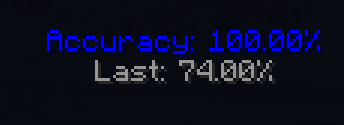
Dynamic HUD Display: Displays real-time accuracy at the top-middle of the screen.
Color-Coded Accuracy Meter: The HUD smoothly transitions from red (low accuracy) to blue (high accuracy) for easy visualization.
Customizable Reset Interval: Configure how long the tracker waits before resetting accuracy calculations. Open the menu through the default keybind “J”
Last Accuracy Display: Keeps track of your last recorded accuracy percentage before resetting.
Lightweight and Performance-Friendly: Designed to have minimal impact on FPS.
 Installation
Install Fabric Loader and Fabric API.
Download the latest version of Accuracy Tracker.
Place the .jar file into your Minecraft mods folder.
Launch the game and start tracking your aim accuracy!
Why Use This Mod?
Whether you’re a competitive PvPer, or just curious about your precision in combat, this mod provides an accurate and unforgiving way to measure your crosshair discipline.
Compatibilty
This mod is built for Fabric and is not compatible with Forge.
It does not interfere with other mods and should work alongside other PVP mods.
Support
If you encounter any issues or have feature requests, feel free to reach out or report bugs.
The mod has reached EOL.
常见问题
Accuracy Tracker 支持哪些 Minecraft 版本?
Accuracy Tracker 支持 Minecraft Java 版 1.20.1–1.21.1,共 2 个版本,可用的加载器:Fabric。下载时注意选择和你游戏版本一致的文件。
Accuracy Tracker 怎么安装?
先用 PCL2 或 HMCL 启动器安装对应版本的 Fabric,再把下载的 .jar 文件放进游戏目录的 mods 文件夹,重新启动游戏即可。开启了版本隔离的,mods 文件夹在 versions/版本名 下面。运行环境:仅客户端。

评论
登录后评论和评分