
Actionbar Coordinates
This lightweight, all-vanilla data pack adds a display of your current coordinates (X, Y, Z) to the Action Bar, right above the hotbar. No more constantly opening the debug screen (F3) – now all the information you need is always right at your fingertips.
截图


介绍
This lightweight, all-vanilla data pack adds a display of your current coordinates (X, Y, Z) to the Action Bar, right above the hotbar. No more constantly opening the debug screen (F3) – now all the information you need is always right at your fingertips.
in the game
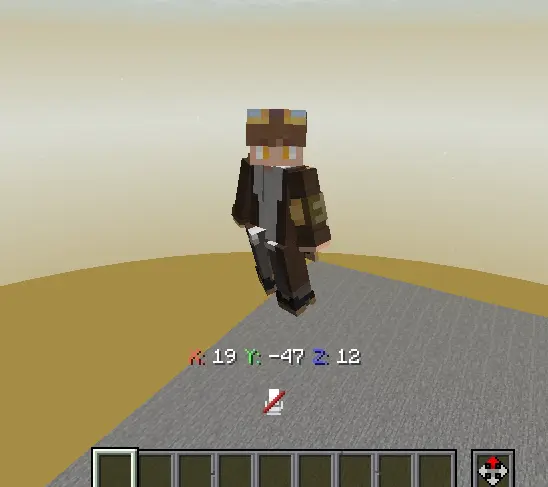
X:Y:Z

常见问题
Actionbar Coordinates 支持哪些 Minecraft 版本?
Actionbar Coordinates 支持 Minecraft Java 版 1.21–26.2,共 14 个版本,可用的加载器:Fabric / Forge / NeoForge / Quilt。下载时注意选择和你游戏版本一致的文件。
Actionbar Coordinates 怎么安装?
先用 PCL2 或 HMCL 启动器安装对应版本的 Fabric / Forge / NeoForge / Quilt,再把下载的 .jar 文件放进游戏目录的 mods 文件夹,重新启动游戏即可。开启了版本隔离的,mods 文件夹在 versions/版本名 下面。运行环境:客户端 / 服务端。
nir.elh3e16 的其他作品
查看全部 →
Bedrock UI for java
This texture pack changes the classic Java interface to the Bedrock interface.

Delta.Pack
Makes Kris armor from the game "DELTARUNE" from netherite armor, as well as a netherite sword and shield
Delta.Pack
Makes Kris armor from the game "DELTARUNE" from netherite armor, as well as a netherite sword and shield

Nir.Armor
This is an addon for my main project, Nir.pack. This addon adds a new texture to Armor.
评论
登录后评论和评分