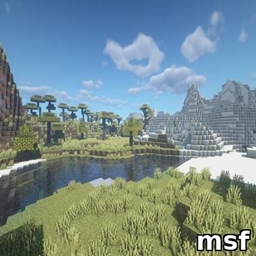
msf
Lightweight Minecraft shader creating a smooth blue iris glow with subtle pulsing, prettier and more performance-friendly than BSL.
介绍
MSF – Lightweight & Beautiful Iris Glow Shader for Minecraft
MSF is a lightweight shader pack for Minecraft that adds a beautiful, smooth blue iris glow effect centered on the screen. Featuring subtle pulsing and soft lighting, this shader enhances visual immersion without sacrificing performance. It is optimized to run smoothly on most hardware, making it an excellent alternative to heavier shaders like BSL.
Features:
-
Smooth blue iris glow effect focused at screen center
-
Gentle pulsing animation for dynamic visuals
-
Soft glow lighting for natural appearance
-
Optimized for high FPS and low resource usage
-
Compatible with OptiFine and Fabric shader loaders
-
Easy to install and customize
Installation:
-
Place the
MSF.zipfile into your Minecraft shaderpacks folder. -
Launch Minecraft with OptiFine or Fabric shader support.
-
Select “MSF” from the shaders menu.
Requirements:
-
Minecraft version 1.14 or higher
-
OptiFine or Fabric with shader support installed
Notes:
-
This shader focuses on minimalism and performance; it does not include complex lighting or shadows.
-
For best experience, use with lightweight resource packs.
常见问题
msf 支持哪些 Minecraft 版本?
msf 支持 Minecraft Java 版 1.19–1.21.8,共 21 个版本,可用的加载器:Iris。下载时注意选择和你游戏版本一致的文件。
msf 怎么安装?
光影需要先装 Iris。把下载的 .zip 文件(不用解压)放进游戏目录的 shaderpacks 文件夹,进游戏后在「选项 → 视频设置 → 光影包」里选中它。光影对显卡要求较高,卡顿可以调低光影设置或渲染距离。
bobbydeveloper 的其他作品
查看全部 →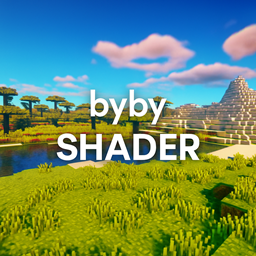
bybyshader
Lightweight shader adding vibrant colors, soft bloom, subtle chromatic aberration, and gentle film grain. Optimized for smooth performance while enhancing Minecraft’s beauty.

fsrmine
FSR is AMD’s upscaling tech boosting FPS. Mods bring FSR to Minecraft, letting players get smoother visuals on more GPUs.

beauderful
Lightweight Minecraft shader creating a smooth blue iris glow with subtle pulsing, prettier and more performance-friendly than BSL.

bedwars1v1
A fast-paced Bedwars 1v1 map using only a datapack: two islands, beds, generators, shop, and emerald center. Break the enemy bed to win—simple, smooth, and plugin-free.
评论
登录后评论和评分