
Flashback actor replay
Add controllable actors, record their performances, and edit them on the Flashback timeline.
截图
介绍
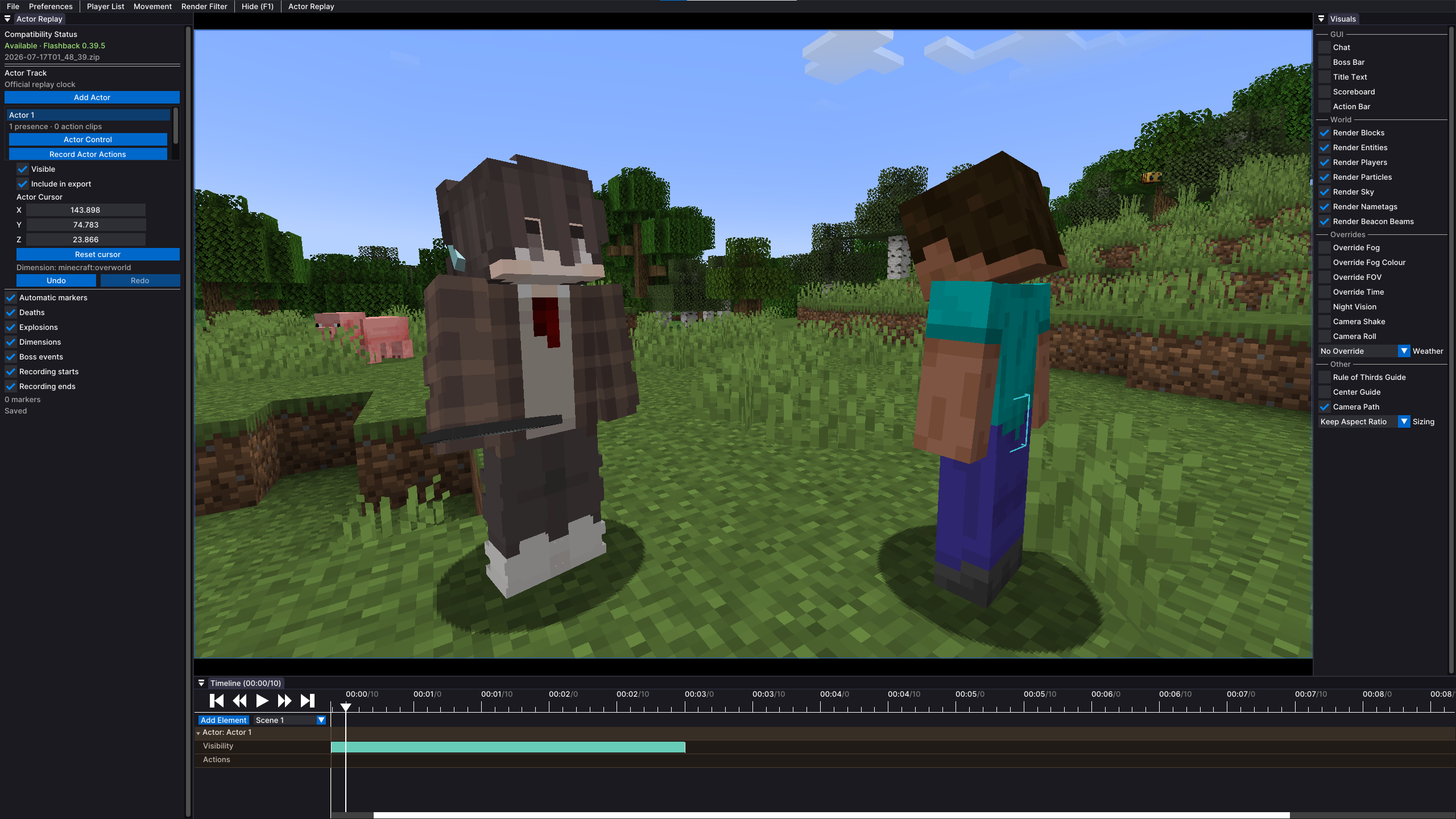
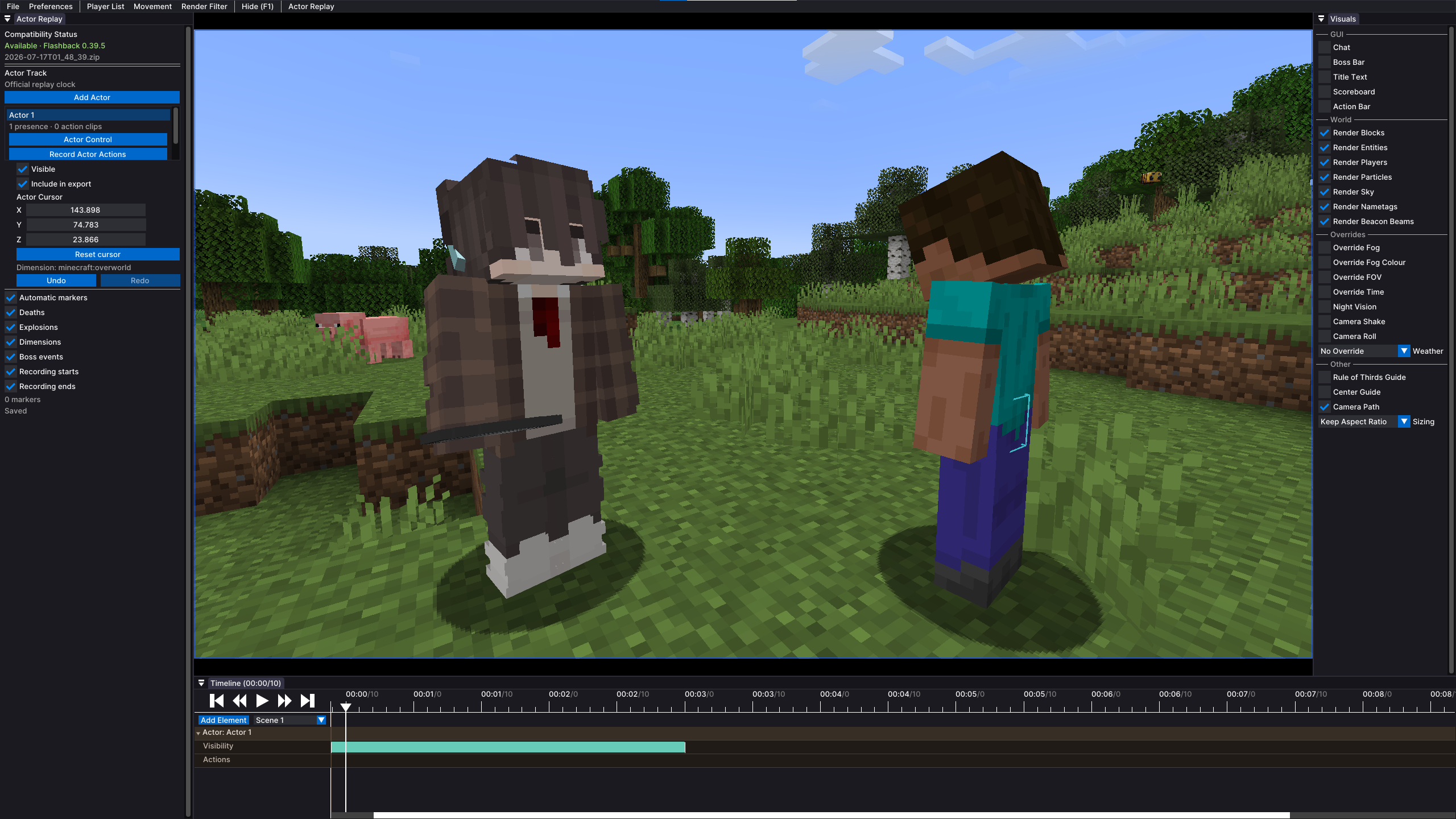
Flashback Actor Replay is a third-party addon for Flashback that adds controllable actors to replay worlds.
Record each character separately, then play all actor performances together in the same replay. It is designed for Minecraft video creators, animators, machinima creators, and solo creators making multi-character scenes.
Add actors, control them like players, record their actions, and edit the results on the Flashback timeline.
Features
- Add multiple actors to a replay world
- Control actors in first-person or third-person
- Record movement and view rotation
- Record jumping, sprinting, sneaking, attacks, and item use
- Give each actor an independent inventory and hotbar
- Equip armor, offhand items, weapons, tools, and modded items
- Create separate timeline tracks for every actor
- Edit recordings as action clips
- Split and delete actor clips
- Control actor visibility
- Save actor data separately from the Flashback replay
- Reopen projects and continue editing
Usage
- Record a replay with Flashback.
- Open the completed replay.
- Open the Actor Replay panel.
- Select Add Actor.
- Set the actor’s position and rotation.
- Configure the actor’s inventory and equipment.
- Move the Flashback playhead to the recording start time.
- Enter actor control mode.
- Start actor recording.
- Wait for the five-second countdown.
- Perform the scene.
- Press
Bto finish and save. - Play the replay to preview the result.
- Repeat the process for additional actors.
Each actor is recorded independently, allowing one person to perform every character in a scene.
Actor Setup
Each actor has independent data:
- Name
- Position
- Rotation
- Inventory
- Hotbar
- Selected item
- Armor
- Offhand item
- Visibility
- Timeline track
- Action clips
Position controls include:
- X
- Y
- Z
- Yaw
- Pitch
Before recording, make sure the actor:
- Is standing on a valid surface
- Is not inside a block
- Faces the correct direction
- Has the correct item selected
- Has the required equipment
- Starts at the correct replay time
Creative item selection is available for actor setup, but actor control still uses normal gravity and collision.
Controls
| Key | Action |
|—|—|
| W, A, S, D | Move |
| Mouse | Look around |
| Space | Jump |
| Sprint key | Sprint |
| Sneak key | Sneak |
| Left click | Attack |
| Right click | Use item |
| Mouse wheel | Change hotbar slot |
| Number keys | Select hotbar slot |
| F5 | Change camera view |
| F6 | Start recording |
| B | Finish and save |
Key bindings can be changed in Minecraft’s control settings.
Check for key conflicts when other mods also use F6, B, or another actor control key.
Recording
When recording starts:
- The replay returns to the selected start time.
- The actor returns to its starting state.
- A five-second countdown begins.
- Actor controls become active.
- Movement and supported actions are recorded.
Wait until the countdown ends before performing the scene.
Recorded actions may include:
- Standing
- Walking
- Running
- Jumping
- Sneaking
- Looking around
- Turning the head
- Switching items
- Attacking
- Swinging the hand
- Using items
Press B when the performance is complete.
The recording will be saved as an action clip on the selected actor’s timeline track.
Timeline
Each actor has an independent timeline track.
Timeline content may include:
- Actor track
- Visibility track
- Action track
- Recorded clips
Available editing actions may include:
- Move
- Trim
- Split
- Delete
Common shortcuts:
| Shortcut | Action |
|—|—|
| Ctrl + B | Split a clip |
| Delete | Delete a clip |
Actor timeline edits do not directly modify the Flashback replay archive.
Projects
Actor data is stored in a separate .farp project file.
A project may contain:
- Actor definitions
- Positions and rotations
- Inventories and equipment
- Visibility data
- Timeline tracks
- Recorded action clips
When the related Flashback replay is opened again, the addon attempts to load its .farp project automatically.
Keep the replay file and its related
.farpfile together when moving or backing up a project.
Compatibility
The current release targets:
| Requirement | Version |
|—|—|
| Minecraft | 1.21.1 |
| Loader | Fabric |
| Java | 21 |
| Flashback | 0.39.5 |
| Dependency | Fabric API |
This table only describes the current release.
Future releases may support other Minecraft versions, loaders, and Flashback versions. Always check the compatibility information on the version page before downloading.
Flashback is required and must be installed separately.
Install
- Install the supported Minecraft version.
- Install Fabric Loader.
- Install Fabric API.
- Install the required Flashback version.
- Place Flashback Actor Replay in the same
modsfolder. - Make sure only one addon version is installed.
- Start Minecraft and open a Flashback replay.
Status
Alpha software: Features, controls, compatibility, and project data may change.
Back up important replay and .farp files before updating.
Compatibility is not guaranteed with every combination of:
- Rendering mods
- Shader mods
- Animation mods
- Player model mods
- Camera mods
- Inventory mods
- Performance mods
- Large modpacks
Unlisted mods should be considered untested.
Reports
Include the following when reporting an issue:
- Minecraft version
- Loader version
- Fabric API version
- Flashback version
- Addon version
- Complete mod list
- Reproduction steps
latest.log- Crash report
- Whether it also happens in a minimal instance
Logs and clear reproduction steps make problems much easier to investigate.
Project
Flashback Actor Replay is an independently developed third-party addon for Flashback.
It is not affiliated with, maintained by, or endorsed by the Flashback developers.
Flashback is a separate project and is not included in this download.
License
Flashback Actor Replay is distributed under an All Rights Reserved license.
See the included license file for the complete terms.
常见问题
Flashback actor replay 支持哪些 Minecraft 版本?
Flashback actor replay 支持 Minecraft Java 版 1.21.1,可用的加载器:Fabric。下载时注意选择和你游戏版本一致的文件。
Flashback actor replay 怎么安装?
先用 PCL2 或 HMCL 启动器安装对应版本的 Fabric,再把下载的 .jar 文件放进游戏目录的 mods 文件夹,重新启动游戏即可。开启了版本隔离的,mods 文件夹在 versions/版本名 下面。运行环境:客户端和服务端都要装。
评论
登录后评论和评分