
LioLoader
LioLoader allows Modpackers to globally load both Data Packs as well as Resource Packs for every world.
截图

介绍

LioLoader is a global datapack and resource pack loader for Minecraft, designed to keep your packs organized and automatically applied across your worlds and servers.
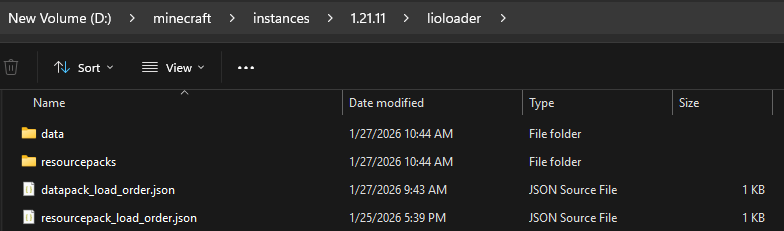
Instead of copying packs into every save, LioLoader will automatically load your datapacks and resource packs that are inside the instance/lioloader folder.
Folder structure
LioLoader scans dedicated folders inside your instance and injects any valid packs directly into Minecraft’s pack system on world load.
Datapack:
instance/lioloader/data/
instance/datapacks/
Unzipped datapack loading is supported and is tied to the pack.mcmeta no matter what subfolder it may be in, as long the datapack is within the Datapack directory above.
Resource Pack:
instance/lioloader/resourcepacks/
Resource packs placed here will be loaded automatically as default packs. They are basically non-removable resource packs that LioLoader applies for you, instead of normal clientside assets you toggle on and off yourself.
(For removable resources please use Vanilla Minecraft’s instance/resourcepacks folder)
Assets:
LioLoader also has a dedicated assets folder for registry aware assets:
instance/lioloader/assets/
Anything placed in this folder will be treated as clientside assets, but still loaded through LioLoader’s registry aware asset handling.
For advanced features such as load priority, nested pack handling, and pack ordering, please refer to the wiki.

Join the Discord for updates, support, previews, and development discussion.

LioLoader is free to use in any modpack. No permission required.
常见问题
LioLoader 支持哪些 Minecraft 版本?
LioLoader 支持 Minecraft Java 版 1.21–26.1.2,共 15 个版本,可用的加载器:Fabric / NeoForge。下载时注意选择和你游戏版本一致的文件。
LioLoader 怎么安装?
先用 PCL2 或 HMCL 启动器安装对应版本的 Fabric / NeoForge,再把下载的 .jar 文件放进游戏目录的 mods 文件夹,重新启动游戏即可。开启了版本隔离的,mods 文件夹在 versions/版本名 下面。运行环境:仅服务端。
Liopyu 的其他作品
查看全部 →
EntityJS
本模组使用KubeJS动态注册实体,并完整支持AI、动画和生成控制!

Lios Overhauled Villages
Lio的村庄大修 概述 欢迎来到Lio的村庄大修!这个模组为村庄带来了更现代、更有活力的氛围,是一次全面的改造。

Lios Spiral Tower Villages
添加独特的螺旋布局高耸村庄,建筑风格别具一格

KubeJS Iron’s Spells
这是一个 KubeJS 附属模组,可用于基于 Iron's Spells 'n Spellbooks 创建自定义法术、法术书等内容。
评论
登录后评论和评分