
Woodcutter
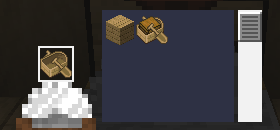
Turn the stonecutter into a woodcutting station: convert logs, planks, stairs, slabs and boats for every vanilla and Nether wood type.
介绍


Woodcutter
Use the stonecutter as a woodcutter!
This fully vanilla data pack adds new recipes to the stonecutter, letting it cut and recycle wood — the same way it already does for stone.
✨ Features
- Logs & wood: switch between logs, stripped logs, wood and stripped wood.
- Planks → wooden blocks: cut planks into stairs, slabs (×2), doors, trapdoors, fences, fence gates, buttons, pressure plates, signs, hanging signs, shelves, boats and chest boats (bamboo planks also give bamboo mosaic).
- Planks → utility blocks: any plank type gives sticks (×2), chests, barrels, bookshelves, chiseled bookshelves, lecterns and beehives.
- Recycling: turn stairs, fences, fence gates, doors, trapdoors, buttons, pressure plates, signs, hanging signs, shelves, boats and utility blocks back into planks — never waste wood on a bad build again. Boats and chest boats convert into each other.
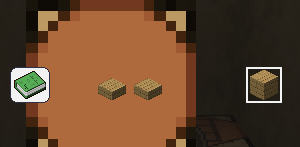
- Slabs → planks: two slabs placed side by side in a crafting table give back one plank.
- Sticks: cut sticks into armor stands, item frames and paintings, and back again.
- Bamboo: bamboo blocks, bamboo planks and scaffolding give back bamboo; bamboo gives scaffolding.
- No new blocks or items: purely new recipes, 100% vanilla. No commands to learn, no new UI.
🌳 Supported wood types
Works with every wood type in the game:


Oak, Dark Oak, Birch, Spruce, Jungle, Acacia, Mangrove, Cherry, Pale Oak, Poplar, Bamboo, plus the Nether variants Crimson and Warped.
Recipes
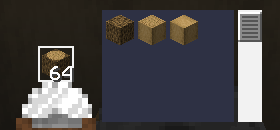
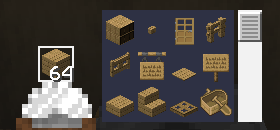
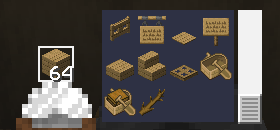
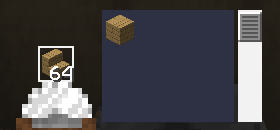
🕹️ How to use
- Install the data pack into your world’s
datapacksfolder (see Installation). - Open a stonecutter as usual.
- Find your new wood recipes right next to the classic stone ones.
Survival- and multiplayer-safe, with zero performance impact.
📦 Compatibility
| | |
|—|—|
| Minecraft versions | 1.19.x · 1.20.x · 1.21.x · 26.1 · 26.2 · 26.3 |
| Type | Data Pack (no mods required) |
| License | MIT |
📥 Installation
Like any data pack: drop the downloaded folder into .minecraft/saves/<your_world>/datapacks/, then run /reload or restart the world.
常见问题
Woodcutter 支持哪些 Minecraft 版本?
Woodcutter 支持 Minecraft Java 版 1.19–26.3,共 29 个版本。下载时注意选择和你游戏版本一致的文件。
Woodcutter 怎么安装?
新建世界时在「数据包」里把下载的 .zip 拖进去;已有的存档,把文件放进存档目录下的 datapacks 文件夹,进游戏输入 /reload 即可生效。服务器同样放在世界目录的 datapacks 里。
Azerxim 的其他作品
查看全部 →
Power Heroes 2 – Comics
Save the world, use your SUPER POWER !!!

Doctor Who Dalek 4 – Invasion
Traveling aboard the T.A.R.D.I.S. and fight evil Daleks.
Quartz UI
A minimalist, white and clear GUI overhaul in 16x — clean and bright, while staying true to vanilla Minecraft's original look and feel.

Doctor Who Dalek 5 – Exterminate
Traveling aboard the T.A.R.D.I.S. and fight evil Daleks.
评论
登录后评论和评分