
SimpleScrollToolTips
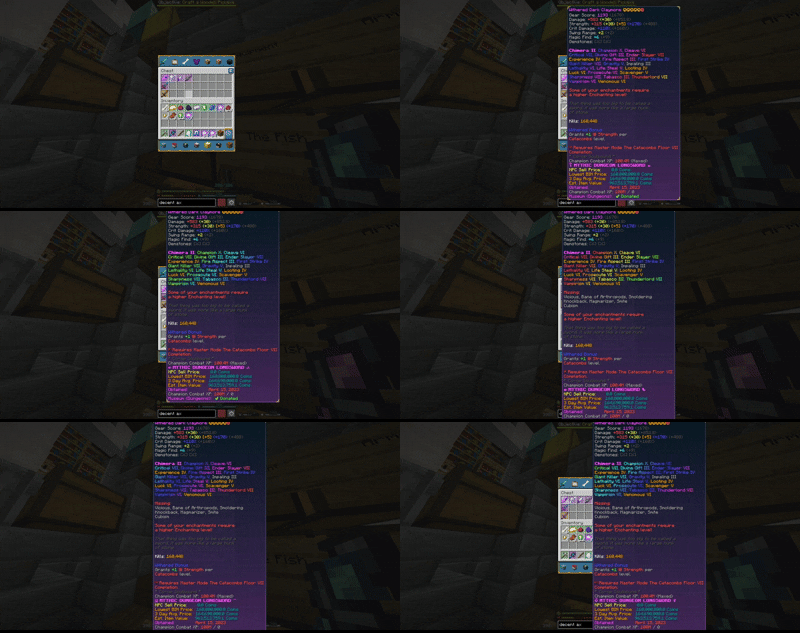
Ever hovered an item with so many enchantments and stats that its tooltip spills past the top and bottom of the screen? Vanilla just clamps it to the edge and the rest is lost. SimpleScrollToolTips lets you scroll and panany tooltip with your mouse!
截图
介绍
SimpleScrollToolTips




Scroll oversized item tooltips so you can actually read the parts that run off your screen.
Ever hovered an item with so many enchantments and stats that its tooltip spills past the top and bottom of the screen? Vanilla just clamps it to the edge and the rest is lost. SimpleScrollToolTips lets you scroll — and pan — any tooltip with your mouse wheel or the arrow keys, so the clipped lines come into view.
Author: Partacus-SPQR
Source: GitHub
Download: Modrinth
Features
- Scroll off-screen tooltips — read tooltips taller (or wider) than your screen instead of having them clamped to the edge
- Mouse wheel to scroll vertically, Shift + wheel to scroll horizontally
- Arrow-key scrolling (↑ ↓ ← →), fully rebindable
- Auto-reset — scroll position resets when you hover a different item
- Adjustable sensitivity and optional per-axis inversion
- Client-side only — works on any server, including stat-heavy ones like SkyBlock
- Mod Menu configuration screen
Controls
Scrolling only acts while you’re hovering an item that has a tooltip.
| Input | Action |
|——-|——–|
| Mouse wheel | Scroll the tooltip vertically |
| Shift + mouse wheel | Scroll the tooltip horizontally |
| ↑ / ↓ | Scroll vertically |
| ← / → | Scroll horizontally |
All keys are rebindable in Options → Controls → SimpleScrollToolTips.
Configuration
Edit in Mod Menu, or directly in config/simplescrolltooltips.json:
| Option | Default | Description |
|——–|———|————-|
| enable | true | Master toggle |
| sensitivity | 10 | Pixels moved per scroll step |
| auto_reset | true | Reset scroll when hovering a new item |
| invert_horizontal | false | Invert horizontal scroll direction |
| invert_vertical | false | Invert vertical scroll direction |
Requirements
- Minecraft 26.1, 26.1.2, or 26.2
- Fabric Loader 0.16.0+
- Fabric API
- Java 25
- (optional) Mod Menu for in-game config
Version Compatibility
| Minecraft | Mod Version | Fabric Loader | Java |
|———–|————-|—————|——|
| 26.2 | 1.0.0 | 0.16.0+ | 25 |
| 26.1.2 | 1.0.0 | 0.16.0+ | 25 |
| 26.1 | 1.0.0 | 0.16.0+ | 25 |
Installation
- Install Fabric Loader for your Minecraft version
- Install Fabric API (and optionally Mod Menu)
- Drop the matching
simplescrolltooltips-<version>.jarinto yourmodsfolder
Building
./gradlew buildAllVersionsPer-version jars are written to versions/<mc>/build/libs/.
How it works
Item tooltips in container screens are positioned by DefaultTooltipPositioner, which clamps oversized tooltips to the screen. SimpleScrollToolTips offsets the tooltip position after that clamp, letting it move off-screen so the hidden lines scroll into view.
License
常见问题
SimpleScrollToolTips 支持哪些 Minecraft 版本?
SimpleScrollToolTips 支持 Minecraft Java 版 26.1–26.2,共 4 个版本,可用的加载器:Fabric。下载时注意选择和你游戏版本一致的文件。
SimpleScrollToolTips 怎么安装?
先用 PCL2 或 HMCL 启动器安装对应版本的 Fabric,再把下载的 .jar 文件放进游戏目录的 mods 文件夹,重新启动游戏即可。开启了版本隔离的,mods 文件夹在 versions/版本名 下面。运行环境:仅客户端。
Partacus-SPQR 的其他作品
查看全部 →
Villager Cycle
A Minecraft Fabric mod that adds a button to refresh villager trades.

SimpleFPS
A lightweight, customizable FPS counter mod with other features, for Minecraft (Fabric 1.21.11, 1.21.10, and 1.21.9).

SimpleLoot
A lightweight Fabric mod for Minecraft that adds Rust-style Hover Loot - quickly transfer items by holding a key and swiping your mouse over slots plus additional QOL features.

SimpleLook
SimpleLook allows you to glance around without changing your movement direction. Hold a key-bind you set then move your mouse to look around independently while running, walking, flying with elytra, flying in creative, swimming, or doing anything else!
评论
登录后评论和评分