
介绍
中文介绍正在准备中,下面暂时显示原文。
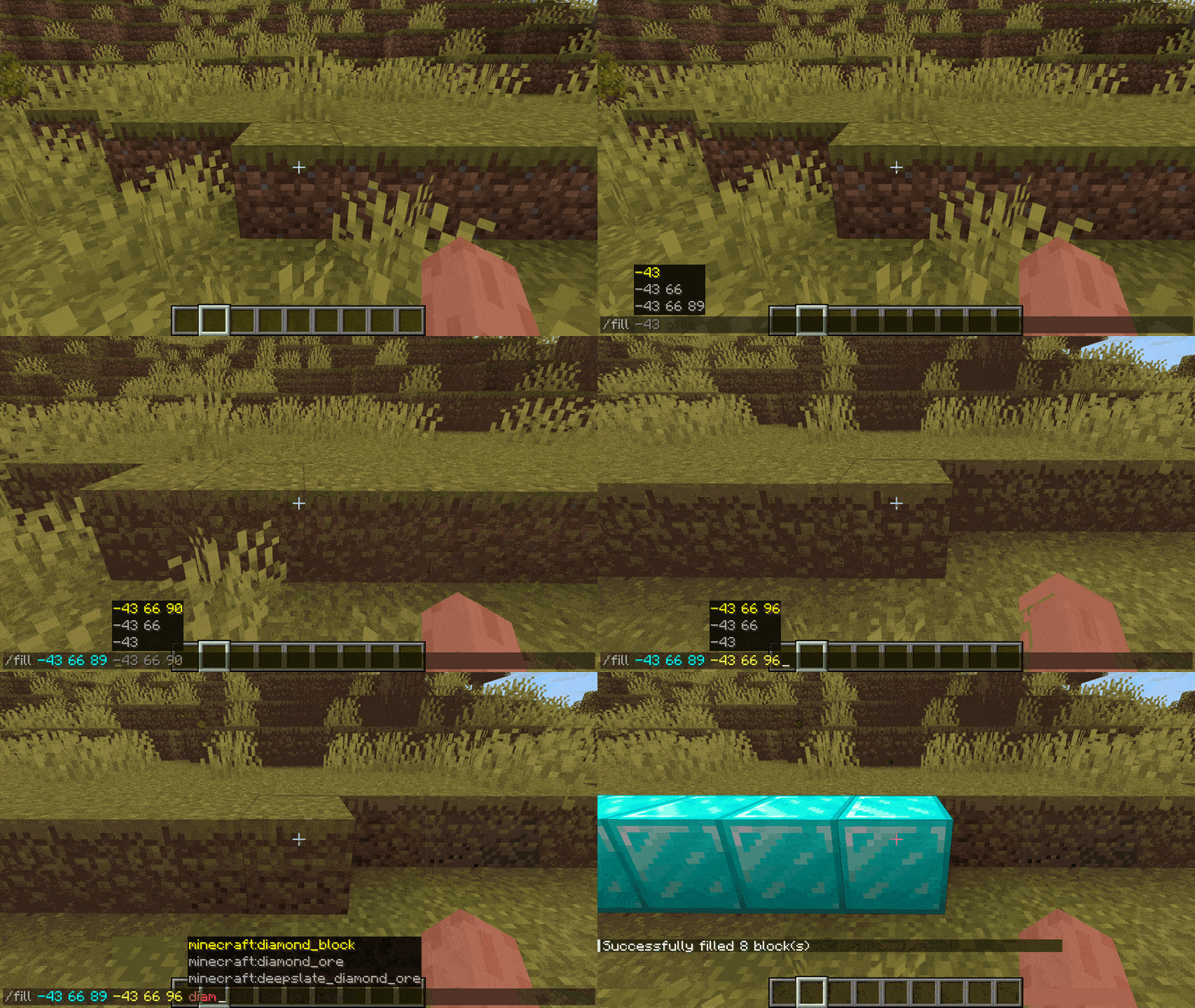
Move & Chat lets you use a keybind – defaults to left control – to bring the chat window out of focus and let you move around. If you are writing a command it will suggest things like coordinates or mob uuids based on what you are looking at.
Keybinds:
- Ctrl to toggle command movement in chat
- Enter while in command movement to accept the current suggestion send the command
- Tab while in command movement to accept the current suggestion and go back to normal mode
- Alt-tab while in command movement to accept current suggestion, add a space to go to next argument but stay in command movement mode
Showcase
–
常见问题
Move & Chat 支持哪些 Minecraft 版本?
Move & Chat 支持 Minecraft Java 版 1.21.6–26.3,共 11 个版本,可用的加载器:Fabric。下载时注意选择和你游戏版本一致的文件。
Move & Chat 怎么安装?
先用 PCL2 或 HMCL 启动器安装对应版本的 Fabric,再把下载的 .jar 文件放进游戏目录的 mods 文件夹,重新启动游戏即可。开启了版本隔离的,mods 文件夹在 versions/版本名 下面。运行环境:仅客户端。


评论
登录后评论和评分