
EtherImagen
adds a simple and immersive way to display your own pictures inside Minecraft. Using special image frames, you can upload images stored on your PC and place them directly in your world as decoration, posters, artwork, signs, memes, event banne
截图


介绍
Description
EtherImagen adds a simple and immersive way to display your own pictures inside Minecraft.
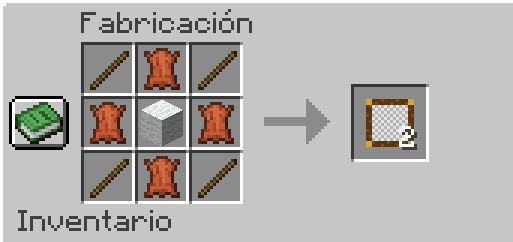
Using special image frames, you can upload images stored on your PC and place them directly in your world as decoration, posters, artwork, signs, memes, event banners, and more.
🖼 Features:
- Upload custom images from your computer
- Place images in decorative frames
- Easy to use in survival or creative worlds
- Multiplayer support
- Lightweight and optimized
🔒 Permissions System:
The mod includes a command to control who can interact with image frames.
Command:
/etherimage requireop
- true → Only OP players can use image frames
- false → All players can use image frames
Examples:
- /etherimage requireop true
- /etherimage requireop false
Support for URL requires watermedia will be added soon
常见问题
EtherImagen 支持哪些 Minecraft 版本?
EtherImagen 支持 Minecraft Java 版 1.20.1–1.21.1,共 2 个版本,可用的加载器:Fabric / Forge。下载时注意选择和你游戏版本一致的文件。
EtherImagen 怎么安装?
先用 PCL2 或 HMCL 启动器安装对应版本的 Fabric / Forge,再把下载的 .jar 文件放进游戏目录的 mods 文件夹,重新启动游戏即可。开启了版本隔离的,mods 文件夹在 versions/版本名 下面。运行环境:客户端和服务端都要装。
jhonii7 的其他作品
查看全部 →
PlayerMusic
Play music using its URL

PlayerMusic
Play music using its URL

Beyond Stuff
This modpack is a recreation inspired by "Action & Stuff" from Minecraft Bedrock Edition, brought to Java Edition through carefully selected texture packs and mods.

EtherTools
Administrative module Administrative menu for series, events, and public servers
评论
登录后评论和评分