
截图
介绍



NO PORT TO FORGE PLANNED! (but feel free to port it by yourself and link it)
Description
This mod allows you to change the way the worldspawn is set! Whether a player is joining an old server for the first time or a player died with no spawn point set, this player will roll the dice to set a new world spawn location. The random location is chosen in an area around the online players that you can customize.
For a better experience with the mod, its configuration can be changed directly in-game
through new commands!
This is a short description, full description below.
FAQ
- Do I need it on my server? Yes. This mod is server side, so you don’t need it on your client
- Can I include it in my modpack? Yes, you are free to include this mod into your modpack
- For any other things: Feel free to share your experience, problems, enhancement ideas in the Discord server, or directly creating issues on the GitHub
Full description
If the changing area is enabled (the main purpose of the mod), when a player joins a server for the first time or dies without a spawn point set, a new worldspawn is randomly set around alive and online players from the Overworld.
Note that if no other player is found, last worldspawn will be used.
Area Shape
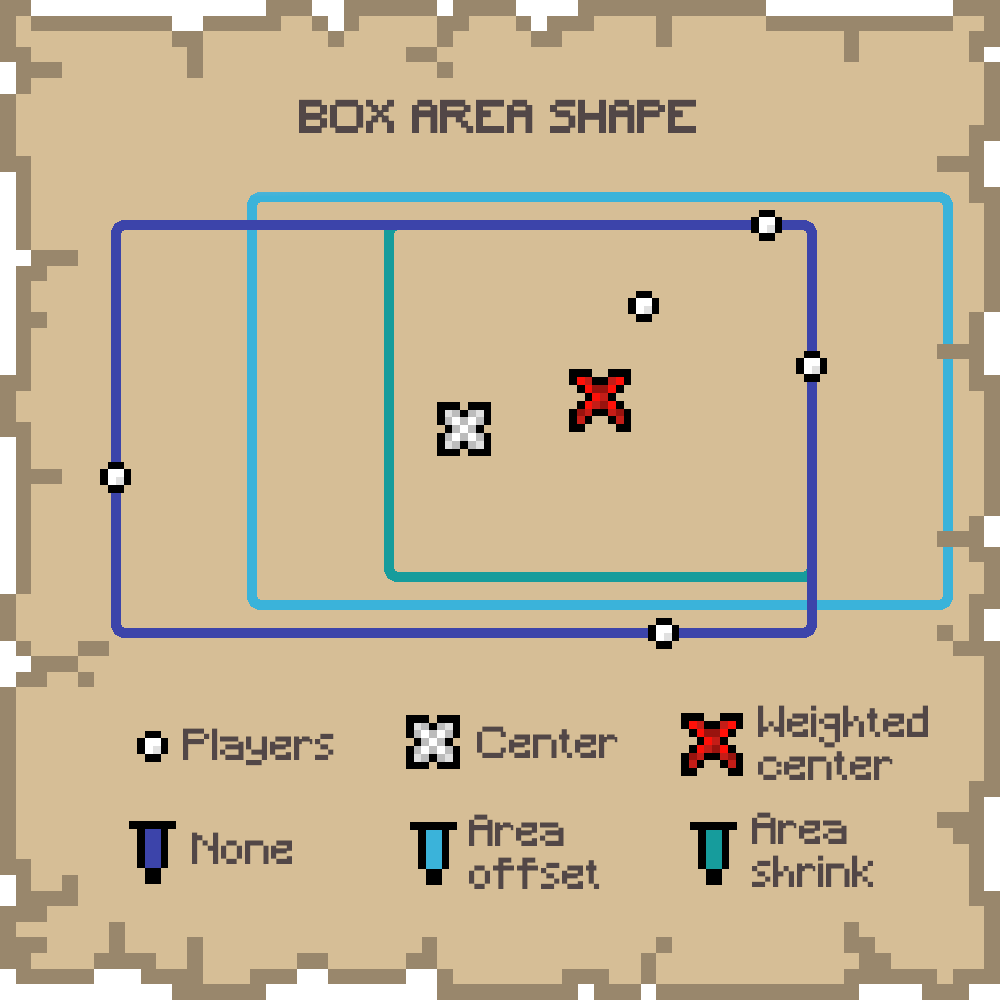
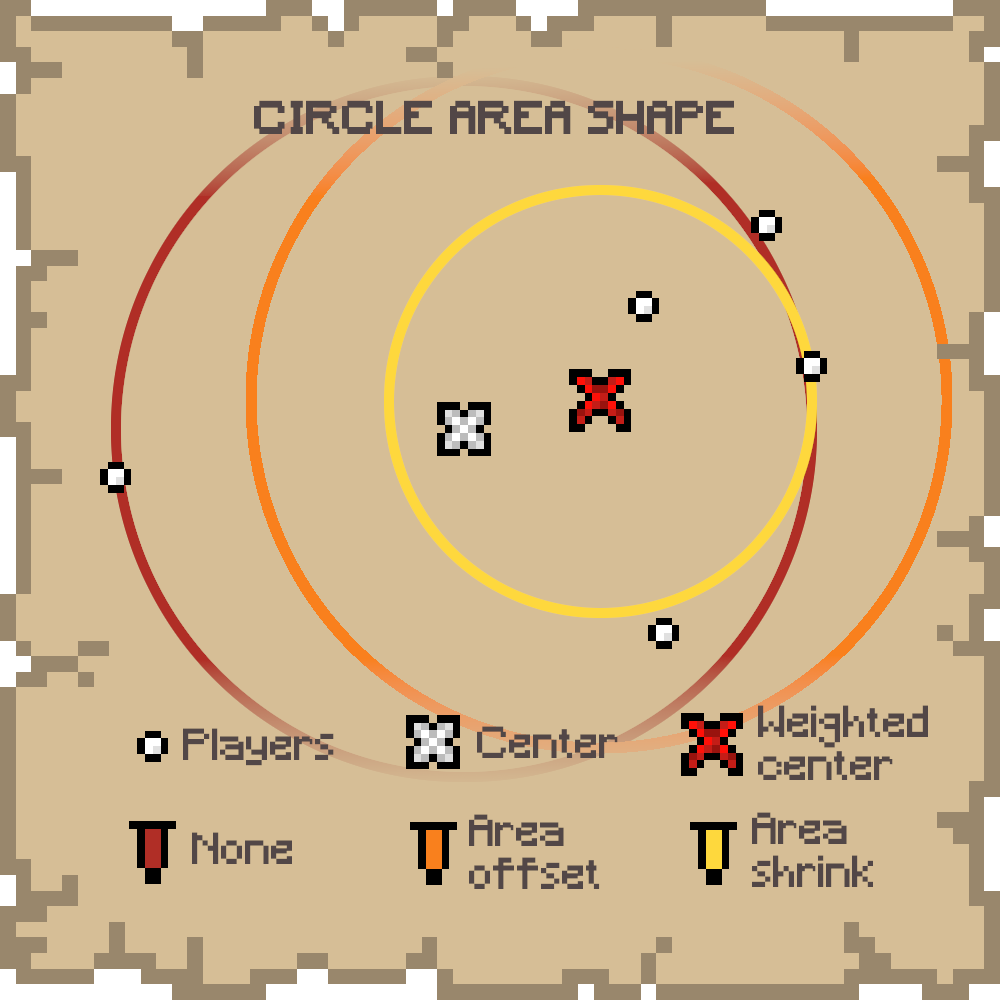
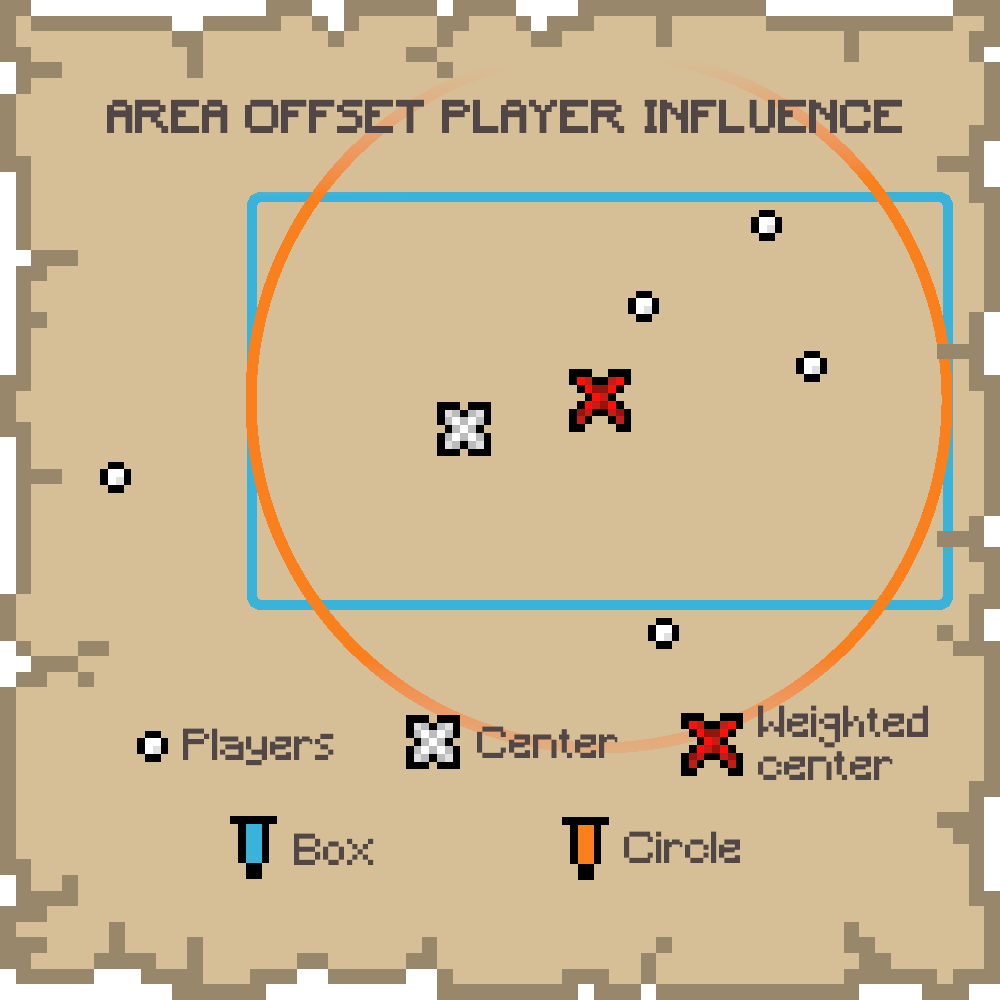
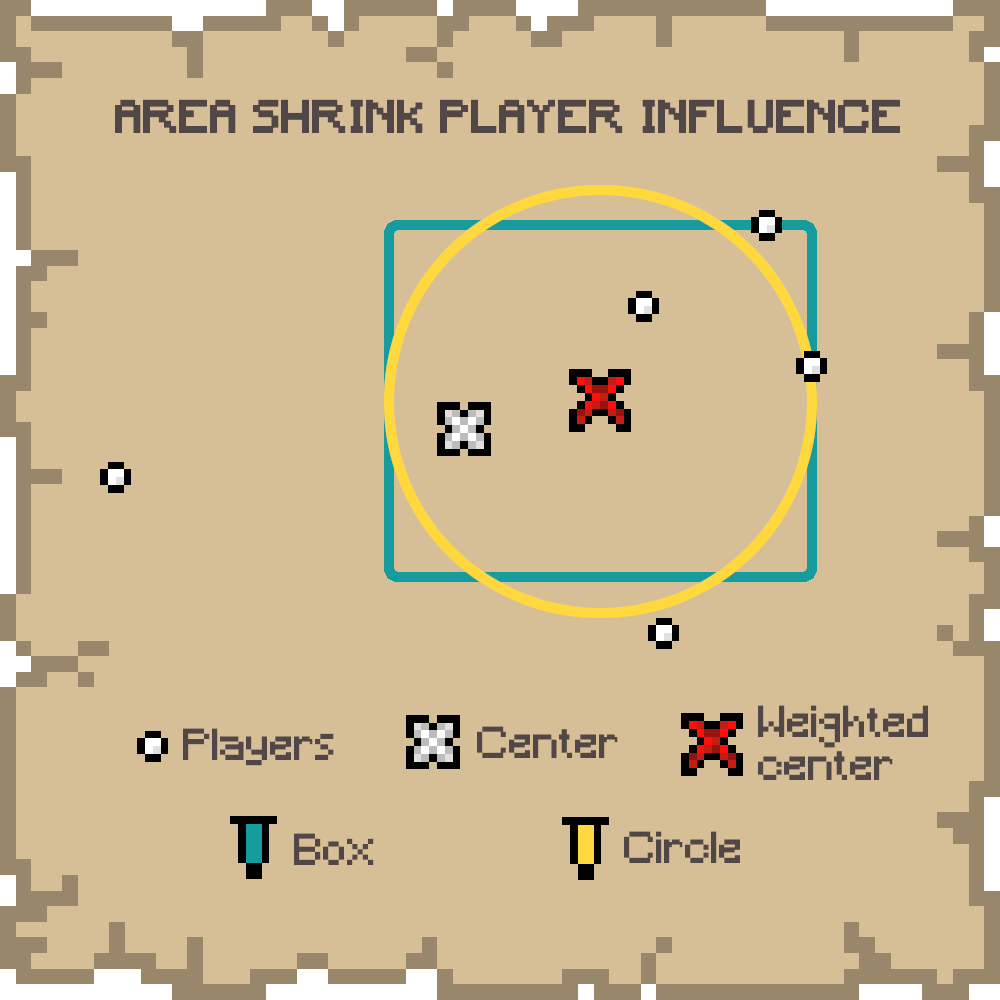
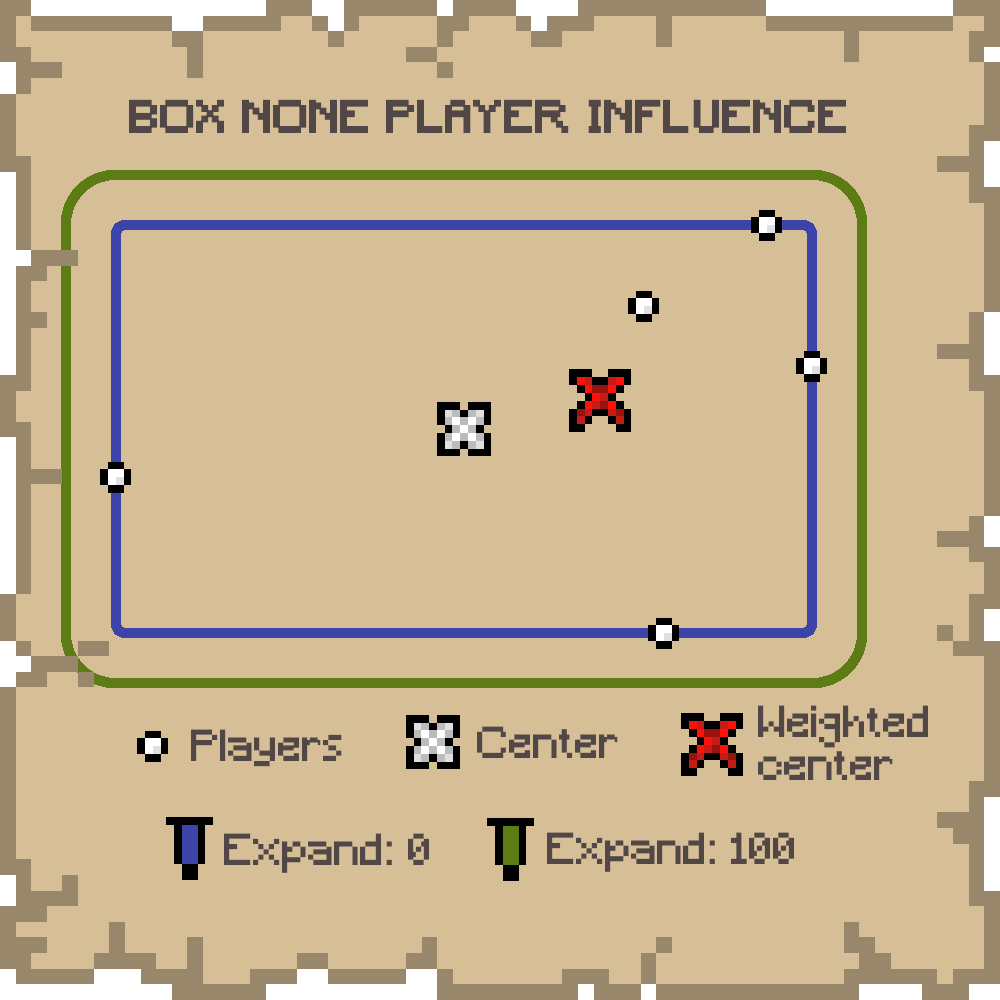
The shape of the area from which a random position is chosen may not necessarily contains every player. This is only the case for the BOX shape. If the player influence is different from NONE, even the BOX may not contain every player.
If only only one other player is found, the shape is necessarily a point. So, unless an expand is set, the worldspawn will be set to the other player’s position.
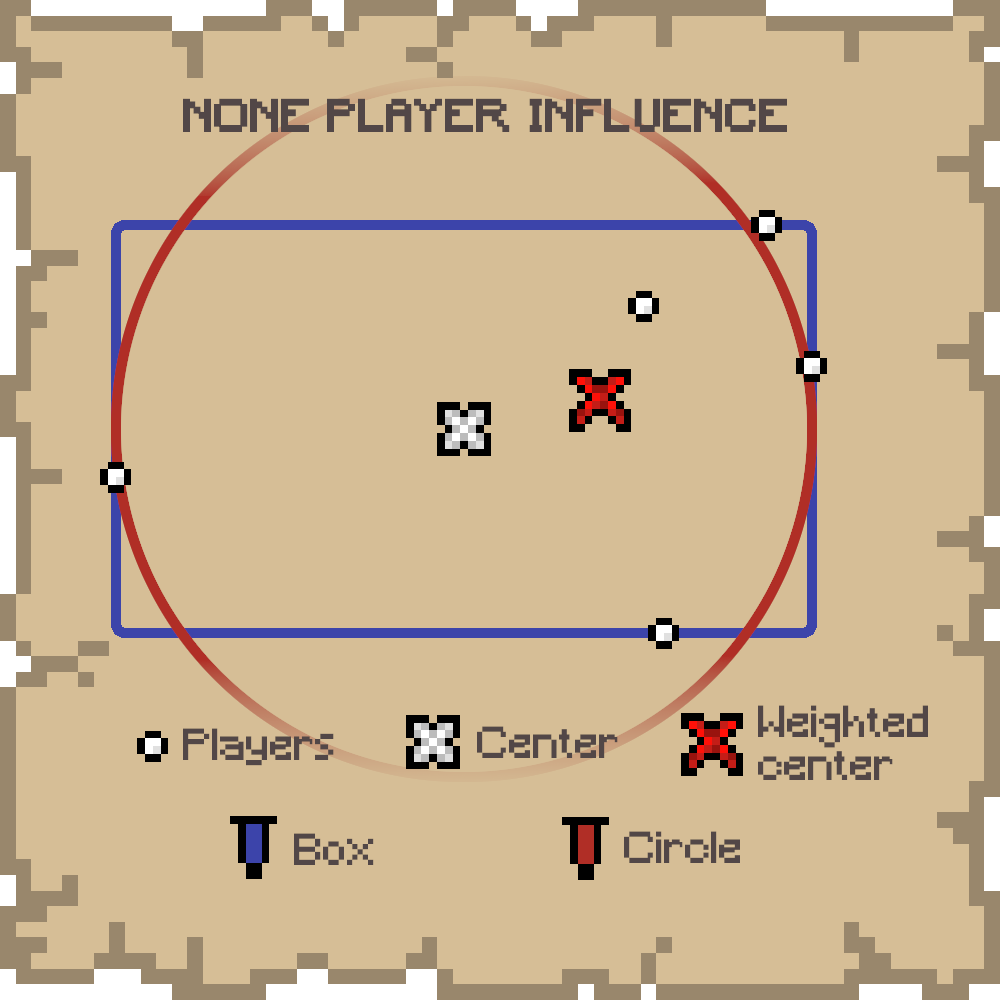
- BOX: A box containing every player
- CIRCLE: A circle centered on the box, with a radius equals to the longest side of the box. If players are far from each other in one direction, this shape will contain a lot more of “empty space”. Note than this is not yet the smallest bounding circle.
Player Influence
To avoid the area being too big (with too much “empty space”) or too far from players, a player influence can be set. This means if there are more players in one side of the shape, the world spawn will be more likely on this side.
- NONE: No player influence on the shape
- AREA OFFSET: A weighted center is computed and the shape is moved toward this new center
- AREA SHRINK: A weighted center is computed and the shape is shrink in a way that makes the shape’s center match the computed one
Expand
The area, no matter the shape or the player influence, may be too small if you want to encourage a bit of running, even though this mod aims to avoid loooong runs. So, you can set an expand value that will expand the shape of this number of blocks in every direction.
Spawn Chunks
In Minecraft, worldspawn chunks are always loaded. Having a worldspawn that can change might be annoying if you plan to setup always loaded machines. Also, it could possibly create lags if your server is not very efficient and your worldspawn chunk radius (future gamerule) is too big.
To avoid this, you can set the (0,0,0) to be the position used for the worldspawn chunks with an option of the mod. You can always update this behavior with the command, but note that the change will be effective only after someone joins or dies.
Commands
Commands require level 2 of permission.
/worldspawn-moddedPrint whether the worldspawn changing area is enabled/worldspawn-modded <enabled>Enable/Disable the worldspawn changing area/worldspawnPrint every custom worldspawn parameters/worldspawn (box|circle) <expand> (none|area_offset|area_shrink)Set every custom worldspawn parameters/worldspawn-areashapePrint worldspawn area shape/worldspawn-areashape (box|circle)Set worldspawn area shape/worldspawn-playerinfluencePrint worldspawn player influence/worldspawn-playerinfluence (none|area_offset|area_shrink)Set worldspawn player influence/worldspawn-expandPrint worldspawn expand value/worldspawn-expand <expand>Set worldspawn expand value/spawnchunksPrint whether the worldspawn chunks use the (0,0,0) or the last worlspawn position/spawnchunks (fixed|worldspawn)Set whether we want the worldspawn chunks to use the (0,0,0) or the last worlspawn position
<enabled> is a boolean value, and <expand> is a positive integer.

常见问题
Near World Spawn 支持哪些 Minecraft 版本?
Near World Spawn 支持 Minecraft Java 版 1.20–1.21.3,共 8 个版本,可用的加载器:Fabric。下载时注意选择和你游戏版本一致的文件。
Near World Spawn 怎么安装?
先用 PCL2 或 HMCL 启动器安装对应版本的 Fabric,再把下载的 .jar 文件放进游戏目录的 mods 文件夹,重新启动游戏即可。开启了版本隔离的,mods 文件夹在 versions/版本名 下面。运行环境:仅服务端。
Pardys 的其他作品
查看全部 →
XP Storage
一种可以通过多种方式储存经验的模组!

XP Storage – Trinkets
一个扩展模组,为XP Storage添加Trinkets支持

The Immersive Music Mod
新增147首歌曲,根据生物群系和建筑切换播放!

So I heard you were talking crap about Minecraft’s difficulty?
基本上算是一次(敌对)生物更新
评论
登录后评论和评分