
NetherPortalHelper
Precise coordinate calculator and navigation HUD for Nether portal linking.
截图
介绍
🔮 Nether Portal Helper
Stop doing math. Start linking portals perfectly.
We’ve all been there: You build a portal in the Nether, step through, and end up inside a stone wall—hundreds of blocks away from your base. Nether Portal Helper is the simple, client-side utility that solves this problem forever.
No more calculators, no more F3 debug screens, and no more guessing.
✨ Features
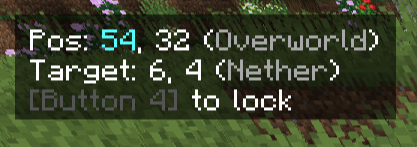
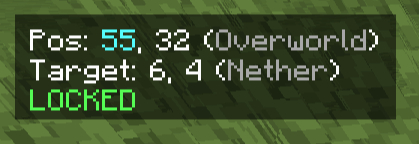
- 🧠 Zero Mental Math: The moment you stand still, the mod instantly calculates the exact coordinate conversion between Overworld (x8) and Nether (/8).
- 🔒 Target Locking System: Found the perfect spot? Press [P] to “freeze” the target coordinates. The mod remembers them for you, so you don’t have to write them down.
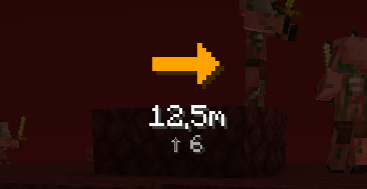
- 🧭 3D Navigation Compass: Once locked, a large, intuitive 3D arrow appears on your screen. It guides you to the exact block you need to place your portal on.
- Green Arrow: You are on the right path.
- Red Arrow: You are going the wrong way (turn around!).
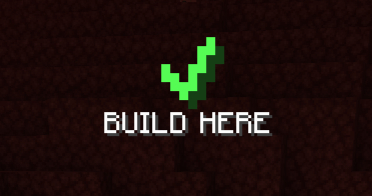
- Checkmark (✔): You have reached the perfect spot. Build here!
- 📏 Precision Mode: The mod checks if you are on the exact block grid (X and Z) to ensure a 1:1 perfect link.
- 👀 Stay Immersed: The UI is designed to be minimal. Toggle the entire overlay on or off instantly with [F6].
🎮 How it works
- Scout: Stand where you want your portal in the Overworld.
- Lock: Look at the HUD (Top Left) and press [P] to lock the destination coordinates.
- Travel: Enter the Nether.
- Navigate: Follow the large navigation arrow in the center of your screen.
- Build: When the arrow turns into a green Checkmark (✔) and says “BUILD HERE”, place your obsidian.
- Done: Light it up! Your portals are now perfectly linked.
🌍 Global Support
The mod automatically adapts to your language settings. Fully translated into:
- 🇺🇸 English
- 🇩🇪 German
- 🇪🇸 Spanish
- 🇫🇷 French
- 🇷🇺 Russian
- 🇨🇳 Chinese (Simplified)
- 🇵🇱 Polish
⚙️ Installation & Config
- Client-Side Only: You can use this on any server (Vanilla, Spigot, Paper, Modded) without the server needing to install it.
- Default Keys:
P: Freeze/Unfreeze CoordinatesF6: Toggle Overlay Visibility- (Keys can be changed in the standard Minecraft Controls menu)
🐞 Issues & Feedback
Found a bug or have a suggestion? Please report it on the Issues Page.
常见问题
NetherPortalHelper 支持哪些 Minecraft 版本?
NetherPortalHelper 支持 Minecraft Java 版 1.21.1–26.2,共 8 个版本,可用的加载器:Fabric。下载时注意选择和你游戏版本一致的文件。
NetherPortalHelper 怎么安装?
先用 PCL2 或 HMCL 启动器安装对应版本的 Fabric,再把下载的 .jar 文件放进游戏目录的 mods 文件夹,重新启动游戏即可。开启了版本隔离的,mods 文件夹在 versions/版本名 下面。运行环境:仅客户端。

评论
登录后评论和评分