Better Formatting Code
A mod allows you to type section code in GUI and decorate texts!
介绍
This mod has two features about text formatting code!

Feature 1. Typing ‘§’ and Decorating
You can input section sign ‘§’ in GUI and decorate chat, sign, item name, mob name, world name, etc.
See the wiki of Formatting Codes.
Formatting Range is a Stack of formatting code.
At the start of range, current formatting codes are saved, and at the end of Formatting Range, restore the saved formatting codes.
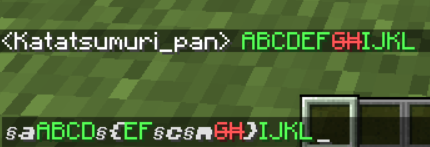
Formatting Range is nestable and can escape ‘}’ by increasing ‘{‘s and ‘}’s. (The number of ‘{‘ is not limited.)

Feature 2. Adding New Formatting Codes
For modders, this is a library mod that allows you to add new formatting codes.
API documents and wiki pages are currently under construction.
2
Notes:
- This is a both(client and server)-side mod.
- Feel free to use this mod in any modpacks.
Mod Compatibilities:
Preparing now…
- Optifine
- Smooth Font
- Better Line Break
Mod Incompatibilities:
- Any other mods that modify FontRenderer.class
常见问题
Better Formatting Code 支持哪些 Minecraft 版本?
Better Formatting Code 支持 Minecraft Java 版 1.12.2,可用的加载器:Forge。下载时注意选择和你游戏版本一致的文件。
Better Formatting Code 怎么安装?
先用 PCL2 或 HMCL 启动器安装对应版本的 Forge,再把下载的 .jar 文件放进游戏目录的 mods 文件夹,重新启动游戏即可。开启了版本隔离的,mods 文件夹在 versions/版本名 下面。运行环境:客户端和服务端都要装。
KatatsumuriPan 的其他作品
查看全部 →
Better Quest Pop-up
"Better" quest pop-up for FTB Quests!

Better Line Break
Better line-breaking mod for not alphabet characters.
Better Line Break
Better line-breaking mod for not alphabet characters.

Nutrition Unofficial Extended Life
An unoffical fork of Nutrition(A Minecraft mod that ensures you eat healthy.)!
评论
登录后评论和评分