
KeybindingLocker
Lock specific keybinding actions remotely from the server. Perfect for events and cutscenes.
截图

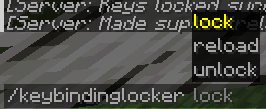

介绍
🔒 KeybindingLocker – Server-Controlled Keybind Locking for Fabric
KeybindingLocker is a lightweight Fabric mod designed for server administrators and event organizers who need to remotely lock specific keybind actions on connected clients.
It enables fine-grained control over player inputs by disabling configurable keybinds during events or gameplay scenarios, enhancing server-side control without client-side mod dependency.
✨ Key Features
- ⛔ Server-Side Keybind Locking
Block specific keybind actions like chat (
key.chat), inventory, or other controls based on server configuration.
- 🔄 Real-Time Sync
When activated via server commands, all connected clients receive updates and have the matching keys locked immediately.
- 🔧 Simple Configuration
Define which keybind actions are locked through an easy-to-edit config file.
- 🎮 Enhances Custom Gameplay & Events
Ideal for roleplay servers, minigames, or events where player controls must be limited temporarily.
⚙️ Compatibility & Requirements
✅ Mod Loader: Fabric
🧩 Minecraft Versions: Supports 1.20.1 and 1.20.4
📦 Dependencies: Fabric API
🔧 Use Cases
- 🎭 Roleplay servers needing to restrict player UI or chat during scenes
- 🎮 Minigames or custom events requiring temporary disabling of specific controls
- 🛡️ Servers aiming to control player input for balance or narrative reasons
📌 Notes
- Requires both client and server installation for full functionality.
- This mod does not modify vanilla keybind behavior outside the server lock state.
🌐 Source Code & Contributions
This mod is open-source and available on GitHub.
Contributions, bug reports, and feedback are welcome!
常见问题
KeybindingLocker 支持哪些 Minecraft 版本?
KeybindingLocker 支持 Minecraft Java 版 1.20.1–1.20.4,共 2 个版本,可用的加载器:Fabric。下载时注意选择和你游戏版本一致的文件。
KeybindingLocker 怎么安装?
先用 PCL2 或 HMCL 启动器安装对应版本的 Fabric,再把下载的 .jar 文件放进游戏目录的 mods 文件夹,重新启动游戏即可。开启了版本隔离的,mods 文件夹在 versions/版本名 下面。运行环境:客户端和服务端都要装。
superstrellaa 的其他作品
查看全部 →
CinematicTools
A Fabric port of CMDCam with an integrated cinematic NPC system and dynamic skins. Perfect for machinimas and scripted scenes.

StorageManager API
An API for manage storage systems in Minecraft backends

BlackBox
Real-time performance and error telemetry, delivered straight to Discord or other ways
评论
登录后评论和评分